HTML Editors
HTML editors are software tools used to create, edit, and manage HTML (Hypertext Markup Language) code for designing web pages.
Some popular HTML editors are mentioned below.
- Notepad
- Sublime Text Editor
- Visual Studio Code
- Java Training School IDE
A simple editor to write any HTML code is NOTEPAD. Following are some simple steps to running your first website.
Step 1: Open any of the text editors of your choice. Here we are using the Notepad text editor.
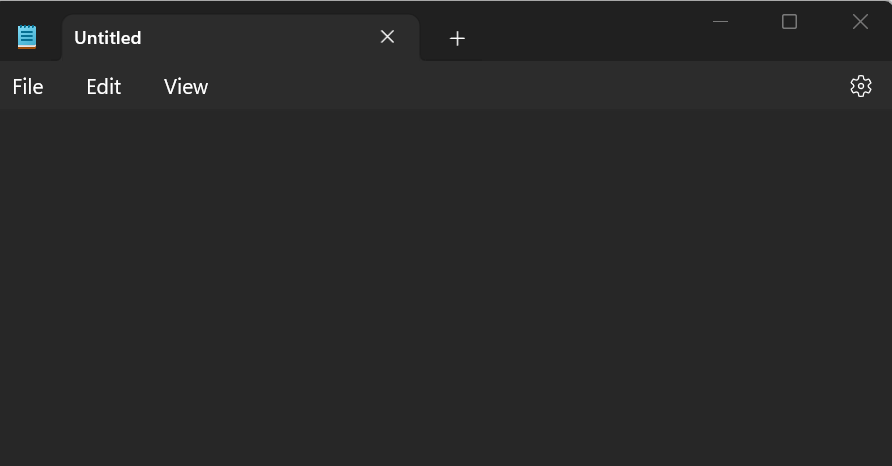
Step 2: Copy and paste the code given below.
<!DOCTYPE html>
<html>
<body>

<h1>I Love Java Training School</h1>

</body>
</html>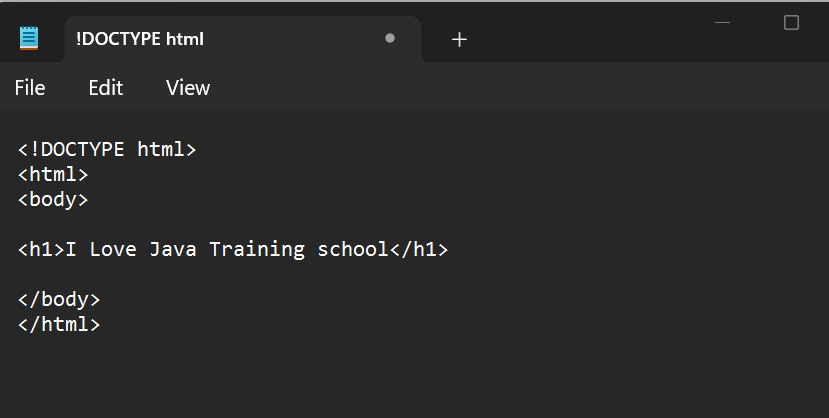
Step 3: Save your Notepad file as “.html” extension by clicking on “File > Save as“.

Note: You can use either .htm or .html as file extension. There is no difference; it is up to you.
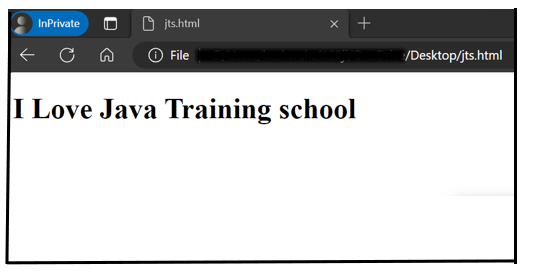
Step 4 : Open the saved HTML file in your favorite browser and then double click on saved file. You will see your first website in your browser.
- Home
- Java
- Java Fundamentals
- What is Java
- History of Java
- Java Version History
- Local Environment Set-up
- First Java Program
- How to set ‘Path’ env variable
- JDK, JRE, and JVM
- Object Oriented Programming
- Java Data Types
- Classes in Java
- Objects in Java
- Interfaces in java
- Class attributes and methods
- Methods In Java
- Variables and Constants in Java
- Java packages and Imports
- Access Modifiers In Java
- Java Operators
- Constructors in Java
- Control Statements – If else
- Control Statements – Loops
- Arrays in Java
- Java Abstraction
- Java Inheritance
- Polymorphism
- Java Exception Handling
- Strings in Java
- File IO
- Java Miscellaneous
- Design Patterns
- Java Fundamentals
- Collections
- Multithreading
- Java New Features
- Servlet
- JSP
- Spring
- Spring-Introduction
- First Spring Application
- Setter Injection
- Constructor injection
- Spring annotations
- Autowiring
- @Autowired Annotation Spring
- Spring MVC
- Spring JdbcTemplate
- Spring jdbcTemplate with MySQL
- Spring AOP
- Spring AOP Examples
- Various pointcut expressions in Spring AOP
- Download and configure Tomcat server
- Hibernate
- Architecture
- Hibernate Example
- First Hibernate Application (using xml configuration)
- First Hibernate Application (using annotations)
- JPA/HB – annotations
- Hibernate Identifiers
- Hibernate Generator Classes
- Save vs saveOrUpdate vs persist in Hibernate
- Inheritance Mapping in Hibernate
- Inheritance Mapping using annotations
- Hibernate Mapping
- Hibernate Query Language (HQL)
- HCQL Hibernate Criteria Query Language
- Hibernate Named Query
- Hibernate Caching
- Second Level Cache
- Spring Boot
- Spring Boot Basics
- Spring Boot Web
- Spring Boot Exception Handling
- Service discovery using Netflix Eureka
- Springboot OpenAPI/Swagger3
- Zuul Proxy Server + Routing
- Spring Cloud Gateway
- Spring Boot Security
- Circuit Breaker using Spring Boot Hystrix
- Interservice Communication
- Spring Boot Hateoas Links Example
- Lombok api
- Spring Boot with Mongo DB
- Load Balancer in Springboot
- Spring Boot Testing
- Spring Web Flux
- Database
- Web Service
- HTML
- Blog & Programs
- Docker
- Trainings
- Home
- Java
- Java Fundamentals
- What is Java
- History of Java
- Java Version History
- Local Environment Set-up
- First Java Program
- How to set ‘Path’ env variable
- JDK, JRE, and JVM
- Object Oriented Programming
- Java Data Types
- Classes in Java
- Objects in Java
- Interfaces in java
- Class attributes and methods
- Methods In Java
- Variables and Constants in Java
- Java packages and Imports
- Access Modifiers In Java
- Java Operators
- Constructors in Java
- Control Statements – If else
- Control Statements – Loops
- Arrays in Java
- Java Abstraction
- Java Inheritance
- Polymorphism
- Java Exception Handling
- Strings in Java
- File IO
- Java Miscellaneous
- Design Patterns
- Java Fundamentals
- Collections
- Multithreading
- Java New Features
- Servlet
- JSP
- Spring
- Spring-Introduction
- First Spring Application
- Setter Injection
- Constructor injection
- Spring annotations
- Autowiring
- @Autowired Annotation Spring
- Spring MVC
- Spring JdbcTemplate
- Spring jdbcTemplate with MySQL
- Spring AOP
- Spring AOP Examples
- Various pointcut expressions in Spring AOP
- Download and configure Tomcat server
- Hibernate
- Architecture
- Hibernate Example
- First Hibernate Application (using xml configuration)
- First Hibernate Application (using annotations)
- JPA/HB – annotations
- Hibernate Identifiers
- Hibernate Generator Classes
- Save vs saveOrUpdate vs persist in Hibernate
- Inheritance Mapping in Hibernate
- Inheritance Mapping using annotations
- Hibernate Mapping
- Hibernate Query Language (HQL)
- HCQL Hibernate Criteria Query Language
- Hibernate Named Query
- Hibernate Caching
- Second Level Cache
- Spring Boot
- Spring Boot Basics
- Spring Boot Web
- Spring Boot Exception Handling
- Service discovery using Netflix Eureka
- Springboot OpenAPI/Swagger3
- Zuul Proxy Server + Routing
- Spring Cloud Gateway
- Spring Boot Security
- Circuit Breaker using Spring Boot Hystrix
- Interservice Communication
- Spring Boot Hateoas Links Example
- Lombok api
- Spring Boot with Mongo DB
- Load Balancer in Springboot
- Spring Boot Testing
- Spring Web Flux
- Database
- Web Service
- HTML
- Blog & Programs
- Docker
- Trainings
- Home
- Java
- Java Fundamentals
- What is Java
- History of Java
- Java Version History
- Local Environment Set-up
- First Java Program
- How to set ‘Path’ env variable
- JDK, JRE, and JVM
- Object Oriented Programming
- Java Data Types
- Classes in Java
- Objects in Java
- Interfaces in java
- Class attributes and methods
- Methods In Java
- Variables and Constants in Java
- Java packages and Imports
- Access Modifiers In Java
- Java Operators
- Constructors in Java
- Control Statements – If else
- Control Statements – Loops
- Arrays in Java
- Java Abstraction
- Java Inheritance
- Polymorphism
- Java Exception Handling
- Strings in Java
- File IO
- Java Miscellaneous
- Design Patterns
- Java Fundamentals
- Collections
- Multithreading
- Java New Features
- Servlet
- JSP
- Spring
- Spring-Introduction
- First Spring Application
- Setter Injection
- Constructor injection
- Spring annotations
- Autowiring
- @Autowired Annotation Spring
- Spring MVC
- Spring JdbcTemplate
- Spring jdbcTemplate with MySQL
- Spring AOP
- Spring AOP Examples
- Various pointcut expressions in Spring AOP
- Download and configure Tomcat server
- Hibernate
- Architecture
- Hibernate Example
- First Hibernate Application (using xml configuration)
- First Hibernate Application (using annotations)
- JPA/HB – annotations
- Hibernate Identifiers
- Hibernate Generator Classes
- Save vs saveOrUpdate vs persist in Hibernate
- Inheritance Mapping in Hibernate
- Inheritance Mapping using annotations
- Hibernate Mapping
- Hibernate Query Language (HQL)
- HCQL Hibernate Criteria Query Language
- Hibernate Named Query
- Hibernate Caching
- Second Level Cache
- Spring Boot
- Spring Boot Basics
- Spring Boot Web
- Spring Boot Exception Handling
- Service discovery using Netflix Eureka
- Springboot OpenAPI/Swagger3
- Zuul Proxy Server + Routing
- Spring Cloud Gateway
- Spring Boot Security
- Circuit Breaker using Spring Boot Hystrix
- Interservice Communication
- Spring Boot Hateoas Links Example
- Lombok api
- Spring Boot with Mongo DB
- Load Balancer in Springboot
- Spring Boot Testing
- Spring Web Flux
- Database
- Web Service
- HTML
- Blog & Programs
- Docker
- Trainings